

We may earn a commission when you buy through links on this page. It doesn’t change what we recommend.
Our picks at a glance
- Logitech MX Master 3S Check price Logitech MX Master 3S
- Logitech Lift Check price Logitech Lift
- Logitech M720 Triathlon Check price Logitech M720 Triathlon
- Logitech M100 Check price Logitech M100
- Logitech MX Anywhere 3S Check price Logitech MX Anywhere 3S
- Logitech Signature M650 Check price Logitech Signature M650
- Logitech G502 HERO Check price Logitech G502 HERO
- SteelSeries Rival 3 Gen 2 Check price SteelSeries Rival 3 Gen 2
- ASUS TUF Gaming M4 Air Lightweight Gaming Mouse Check price ASUS TUF Gaming M4 Air Lightweight Gaming Mouse
- Microsoft Bluetooth Ergonomic Mouse Check price Microsoft Bluetooth Ergonomic Mouse
A mouse is an essential tool for anyone who spends a significant amount of time working on a computer. Whether you’re a graphic designer, writer, or just someone who spends hours on the computer for work, having a mouse that is comfortable to use and precise in its movements is crucial. With so many options on the market, finding the best mouse for work can be overwhelming. But fear not, this guide will help you navigate the world of computer mice and find the one that’s right for you.
The Importance of Ergonomics
The best mouse for work needs to be comfortable to use, even if you’ll be spending hours with it in your hand. A mouse that is too small, too big, or has buttons in the wrong place can cause discomfort or even pain over time.
When looking for an ergonomic mouse, it’s important to consider:
- The size of your hand
- The shape of the mouse
- The position of the buttons
A mouse that fits comfortably in your hand and has buttons that are easy to reach will reduce the risk of injury and make working on your computer a more pleasant experience.
The Benefits of Wireless Mice
Wireless mice offer several advantages over traditional wired mice, including:
- Increased mobility: With a wireless mouse, you’re not limited by the length of a cable, giving you more freedom of movement.
- Better organization: A wireless mouse eliminates the need for a cord, keeping your desk neat and organized.
- Improved aesthetics: A wireless mouse provides a cleaner look, giving your workspace a more professional appearance.
While wireless mice have come a long way in terms of battery life and reliability, it’s important to choose a mouse with a long battery life to ensure you won’t be constantly replacing batteries or searching for a charging cable.
The Importance of Precision
Precision is crucial for any task that requires mouse accuracy, such as photo editing, gaming, or design work. The best mouse for work needs to be precise in its movements and have a high-quality optical or laser sensor.
When shopping for a precise mouse, consider the following:
- The type of sensor: Optical and laser sensors are the most common types of mouse sensors. Optical sensors are more affordable and work well on most surfaces, while laser sensors provide more precise tracking and are better suited for gamers and designers.
- The sensitivity of the sensor: The sensitivity of the mouse’s sensor will affect its precision. A mouse with a higher sensitivity will be more precise, but may also be more sensitive to movement and cause unwanted cursor movements.
- The DPI: DPI, or dots per inch, is a measure of the mouse’s sensitivity. A mouse with a higher DPI will allow you to move the cursor further with less movement, making it more precise.
The best mouse for work depends on your specific needs and preferences. Here are some popular options:
Logitech MX Master 3S
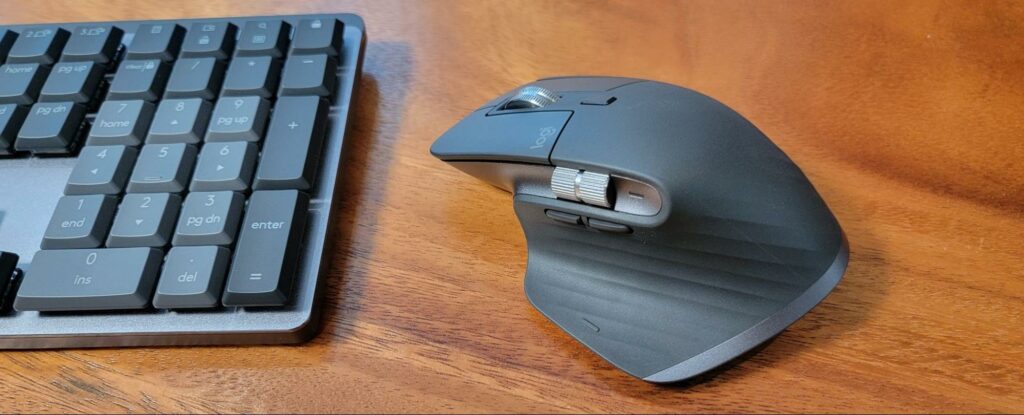
Overall, the Logitech MX Master 3S is a top-of-the-line productivity mouse that offers a comfortable grip, advanced features, and the versatility to keep up with your demanding workflow.
Read the full write-up
The Logitech MX Master 3S is a premium productivity mouse that is designed for comfort and versatility. It has an ergonomic design with a thumb rest and a thumb wheel for improved control, as well as a unique thumb gesture button that allows you to perform tasks like switching between apps or desktops with a single click.
In addition to its advanced features, the Logitech MX Master 3S also has the ability to connect to multiple devices, so you can easily switch between your computer, laptop, and tablet with the touch of a button. It also has an 8000 DPI sensor that tracks on almost any surface, including glass, quiet clicks, and a battery that lasts up to 70 days on a full charge.
If the MX Master 3S feels too big for your hand, or you want to try a vertical grip to take pressure off your wrist, Logitech’s Lift is the next model to look at.
Logitech Lift

Overall, the Logitech Lift is a good first vertical mouse for people with small or medium hands who feel wrist strain with a regular mouse, and it costs less than the MX Master 3S.
Read the full write-up
The Logitech Lift is a vertical ergonomic mouse made for small to medium right hands (a left-handed version is also sold). Its 57-degree angle holds your hand in a handshake position, which takes pressure off the wrist and forearm during long workdays. It has a softly textured grip, a thumb rest, quiet clicks and a SmartWheel for both precise and fast scrolling.
It connects over Bluetooth Low Energy or the included Logi Bolt USB receiver, pairs with up to three devices through Easy-Switch, and works with Windows, macOS, iPadOS, ChromeOS and Linux. Four buttons can be customised in Logi Options+. Logitech lists up to two years of battery life from a single AA battery, a weight of 125 g and tracking of up to 4000 DPI.
Logitech M720 Triathlon

Overall, the Logitech M720 Triathlon is a versatile and convenient mouse that is ideal for users who need to switch between multiple devices, and who value accuracy, reliability, and long battery life.
Read the full write-up
The Logitech M720 Triathlon is a multi-device wireless mouse designed for users who need to switch between multiple computers or devices. It has a compact, ergonomic design and the ability to connect to up to three devices using Logitech’s Easy-Switch technology. This allows you to switch between devices with the touch of a button, making it easy to work on multiple computers or devices without having to constantly unplug and re-pair your mouse.
In addition to its multi-device connectivity, the Logitech M720 Triathlon also features a high-precision optical sensor with a maximum sensitivity of 1000 DPI, making it accurate and responsive on a variety of surfaces. It also has a long battery life of up to two years, so you can work without having to worry about constantly changing batteries.
Logitech M100

Overall, the Logitech M100 is a simple, reliable, and affordable mouse that is ideal for users who want a basic mouse for everyday computing tasks.
Read the full write-up
The Logitech M100 is an entry-level wired mouse designed for basic computing tasks like web browsing, emailing, and document editing. It has a simple, compact design that is comfortable to use, and a high-precision optical sensor that delivers accurate and reliable tracking.
The Logitech M100 has three buttons and a scroll wheel, allowing you to navigate your computer with ease. It is plug-and-play, meaning that you can simply plug it into a USB port and start using it right away, without the need to install any software.
One of the key benefits of the Logitech M100 is its affordability. It is an affordable option for users who need a basic mouse for everyday computing tasks, and who don’t require advanced features like customizable buttons or multi-device connectivity.
Logitech MX Anywhere 3S
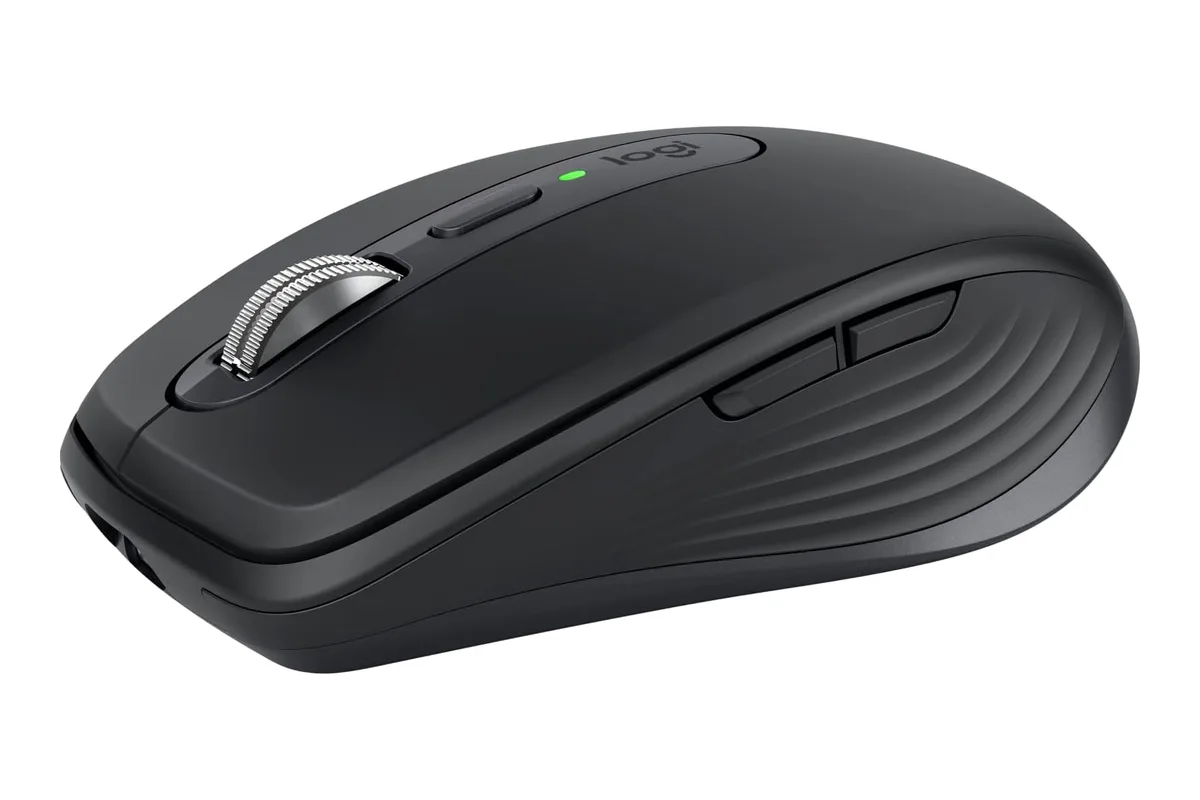
Overall, the MX Anywhere 3S is a good pick if you want MX-series scrolling and multi-device switching in a mouse small enough to carry everywhere.
Read the full write-up
The Logitech MX Anywhere 3S is a compact wireless mouse for people who work from a desk one day and a laptop bag the next. It takes the place of the Razer Pro Click Mini, which is no longer available.
It uses an 8K DPI sensor that Logitech says works on almost any surface, glass included, so you don’t need a mouse pad at a café table or a glass desk. The clicks are quieter than on the older MX Anywhere 3, and the MagSpeed wheel can scroll up to 1,000 lines per second, which helps with long spreadsheets and documents.
It pairs with up to three devices over Bluetooth and works with Windows, macOS, ChromeOS and Linux. The box contains only a USB-C charging cable: there is no USB receiver, so a desktop without Bluetooth needs a separately sold Logi Bolt receiver. A full charge lasts up to 70 days, and a one-minute charge gives about three hours of use. Buttons can be remapped per app in Logi Options+.
Logitech Signature M650

Overall, the Logitech Signature M650 is a stylish and comfortable wireless mouse that is ideal for users who want a mouse that is easy to use and looks great on their desk.
Read the full write-up
The Logitech Signature M650 is a wireless mouse designed for users who want a mouse that is stylish, comfortable, and easy to use. It has a minimalist, modern design that is inspired by Scandinavian design principles, and a comfortable ergonomic shape that is comfortable to use for extended periods of time.
The Logitech Signature M650 has a high-precision optical sensor with a maximum sensitivity of 1000 DPI, making it accurate and responsive on a variety of surfaces. It also has a long battery life of up to 18 months, so you can work without having to worry about constantly changing batteries.
In addition to its performance and battery life, the Logitech Signature M650 also has a simple, intuitive layout with three buttons and a scroll wheel, making it easy to navigate your computer. It is also wireless, allowing you to work without being tethered to your computer by a cable.
Logitech G502 HERO

Overall, the Logitech G502 HERO is a high-performance gaming mouse that offers a comfortable grip, advanced features, and the versatility to keep up with the demands of competitive gaming.
Read the full write-up
The Logitech G502 HERO is a high-performance gaming mouse designed for gamers who demand the best performance and customization options. It has a comfortable ergonomic design and a high-precision 16000 DPI optical sensor, making it accurate and responsive on a variety of surfaces.
The Logitech G502 HERO also has customizable RGB lighting, allowing you to personalize the look of your mouse to match your setup. In addition, it has 11 programmable buttons, allowing you to configure the mouse to your specific needs and preferences.
One of the key features of the Logitech G502 HERO is its advanced software, which allows you to adjust sensitivity, create custom macros, and configure the mouse to your specific needs. The mouse also has on-board memory, allowing you to save your settings and take them with you wherever you go.
SteelSeries Rival 3 Gen 2
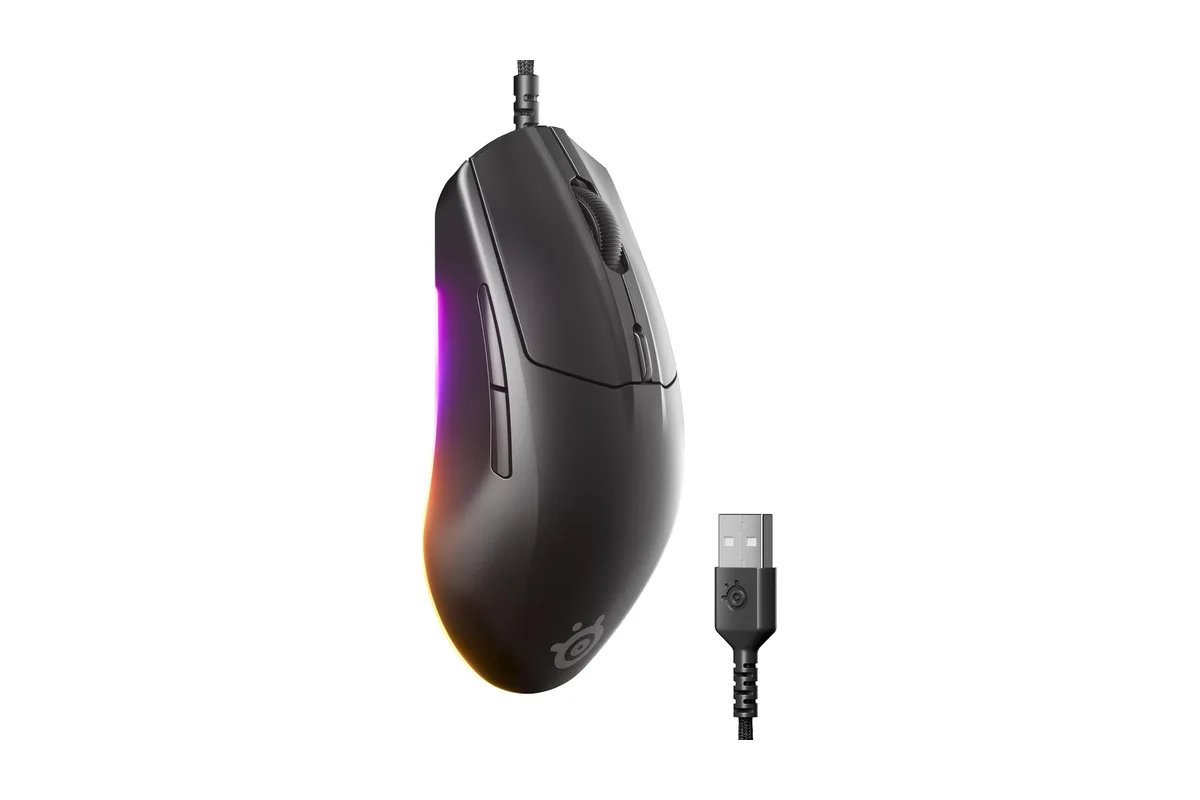
Overall, the Rival 3 Gen 2 is an affordable, durable mouse for people who split their time between work and games and don't need wireless or multi-device features.
Read the full write-up
The SteelSeries Rival 3 Gen 2 is a low-cost wired gaming mouse and the successor to the original Rival 3, which is no longer sold. It suits people whose work computer is also their gaming PC.
It uses SteelSeries’ TrueMove Core optical sensor with up to 8,500 DPI and 1-to-1 tracking, and SteelSeries lists a click latency of 1.35 ms. The switches are rated for 60 million clicks, so the main buttons should hold up to years of daily use.
The cable is a braided “super mesh” paracord that is more flexible and drags less than a plain rubber cable. There is three-zone RGB lighting, which you can customise or tone down if you want a plainer look on a work desk. Because it’s wired, there are no batteries to charge or replace.
ASUS TUF Gaming M4 Air Lightweight Gaming Mouse

Overall, the ASUS TUF Gaming M4 Air is a lightweight and portable gaming mouse that packs a lot of performance and features into a small form factor, making it a great choice for gamers who want a mouse that is easy to carry and use on the go.
Read the full write-up
The ASUS TUF Gaming M4 Air is a lightweight gaming mouse designed for gamers who want a mouse that is easy to carry and use on the go. Despite its lightweight design, it still packs a lot of performance and features into a compact form factor.
The ASUS TUF Gaming M4 Air has a high-precision optical sensor with a maximum sensitivity of 16000 DPI, making it accurate and responsive on a variety of surfaces. It also has customizable RGB lighting, allowing you to personalize the look of your mouse to match your setup.
In addition to its performance and customization options, the ASUS TUF Gaming M4 Air also has a comfortable ergonomic design that is comfortable to use for extended periods of time. It is also lightweight, making it easy to carry and use on the go.
Ultimately, the best mouse for you will depend on your specific needs and preferences, so it’s important to consider factors like ergonomics, connectivity options, and features when making your decision.
Microsoft Bluetooth Ergonomic Mouse

Overall, the Microsoft Bluetooth Ergonomic Mouse is a comfortable and reliable wireless mouse that is ideal for users who want a mouse that is comfortable to use for extended periods of time.
Read the full write-up
The Microsoft Bluetooth Ergonomic Mouse is a wireless mouse designed for users who want a comfortable, ergonomic mouse for extended periods of use. It has a unique design that is sculpted to fit the contours of your hand, reducing strain and fatigue during extended periods of use.
The Microsoft Bluetooth Ergonomic Mouse has a high-precision optical sensor with a maximum sensitivity of 1000 DPI, making it accurate and responsive on a variety of surfaces. It also has a long battery life of up to three months, so you can work without having to worry about constantly changing batteries.
In addition to its performance and battery life, the Microsoft Bluetooth Ergonomic Mouse also has a simple, intuitive layout with two buttons and a scroll wheel, making it easy to navigate your computer. It is also wireless, allowing you to work without being tethered to your computer by a cable.
The Best Mouse for Work: FAQs
Q: What is the best type of mouse for work?
A: The best type of mouse for work will vary depending on your specific needs and preferences. Some people prefer an ergonomic mouse with a comfortable grip, while others may prioritize precision and choose a mouse with a high-quality sensor. Our top suggestion is the Logitech MX Master 3S.
Q: Is a wired or wireless mouse better for work?
A: Both wired and wireless mice have their own advantages and disadvantages. A wired mouse is typically more reliable and doesn’t require a battery.
Q: Is a wired or wireless mouse better for work?
A: This depends on your specific needs and preferences. Wired mice are generally more reliable and have a faster response time, while wireless mice offer more freedom of movement and can be more convenient.
Q: How important is ergonomics in a mouse for work?
A: Ergonomics is important in a mouse for work, as it can help reduce strain and fatigue during extended periods of use. Look for a mouse with a comfortable grip and a design that fits the contours of your hand.
Q: What are the benefits of a multi-device mouse for work?
A: A multi-device mouse can allow you to switch between multiple computers or devices with the touch of a button, making it easy to work on multiple devices without having to constantly unplug and re-pair your mouse.
These are just a few of the many questions you might have when looking for the best mouse for work. Ultimately, the best mouse for you will depend on your specific needs and preferences, so it’s important to consider factors like ergonomics, connectivity options, and features when making your decision.